End-to-end product design · Android app · Instrumentation

Pilabz UVA

UVA is a wireless electrical measurement instrument that combines DMM, LCR, 1-phase PQA, and 3-phase PQA into one device. Instead of placing the screen on the hardware, UVA moves the measurement interface to an Android phone or tablet.

As the only designer on the product, I owned the core app experience from research to final UI, and also extended the design language into supporting deliverables like brochure and packaging labels for beta release.

Role
UI/UX Designer Sole designer · Research to handoff
Deliverables
Research · App UI · Supporting collaterals
Platform
Android · Landscape · Dark theme
Status
Final testing · Beta release upcoming

01 — Overview

One device. Four instruments. One app experience.

UVA brought four electrical measurement tools into one wireless product. Each instrument had different readings, parameters, graphs, connection needs, and save behaviours. The challenge was to make the app feel like one unified product, not four different apps placed inside one interface.

02 — Problem

Complex measurement workflows on a small mobile screen

Traditional measurement instruments usually have built-in screens and physical controls. UVA removed the screen from the hardware and shifted the interaction to a mobile device.

That created three UX problems:

Problem
Why it mattered
Four instruments had different workflows
Users should not relearn the app every time they switch modes
Wrong probe setup could lead to no reading or wrong readings
Users needed guidance before and during measurement
Landscape keyboard could cover live data
Active measurement should not be interrupted by typing

03 — Solution

A consistent measurement system for every instrument

I designed a shared app structure that worked across all four instruments:

Connect
device
Select
instrument
Confirm
probe setup
View
reading
Save
value
Review
logs

The content changed based on the selected instrument, but the layout logic stayed consistent.

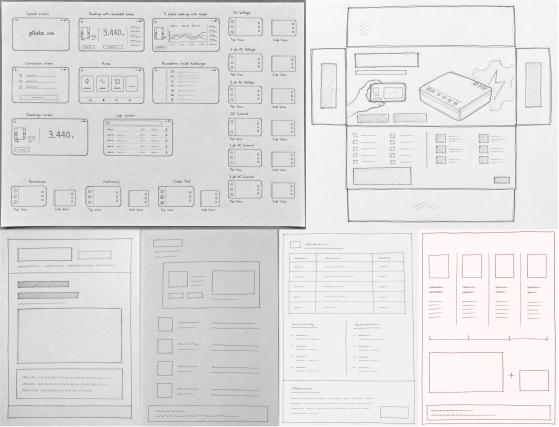
UVA early sketches

First scribbles on paper - instruments, layouts, and reading hierarchies.

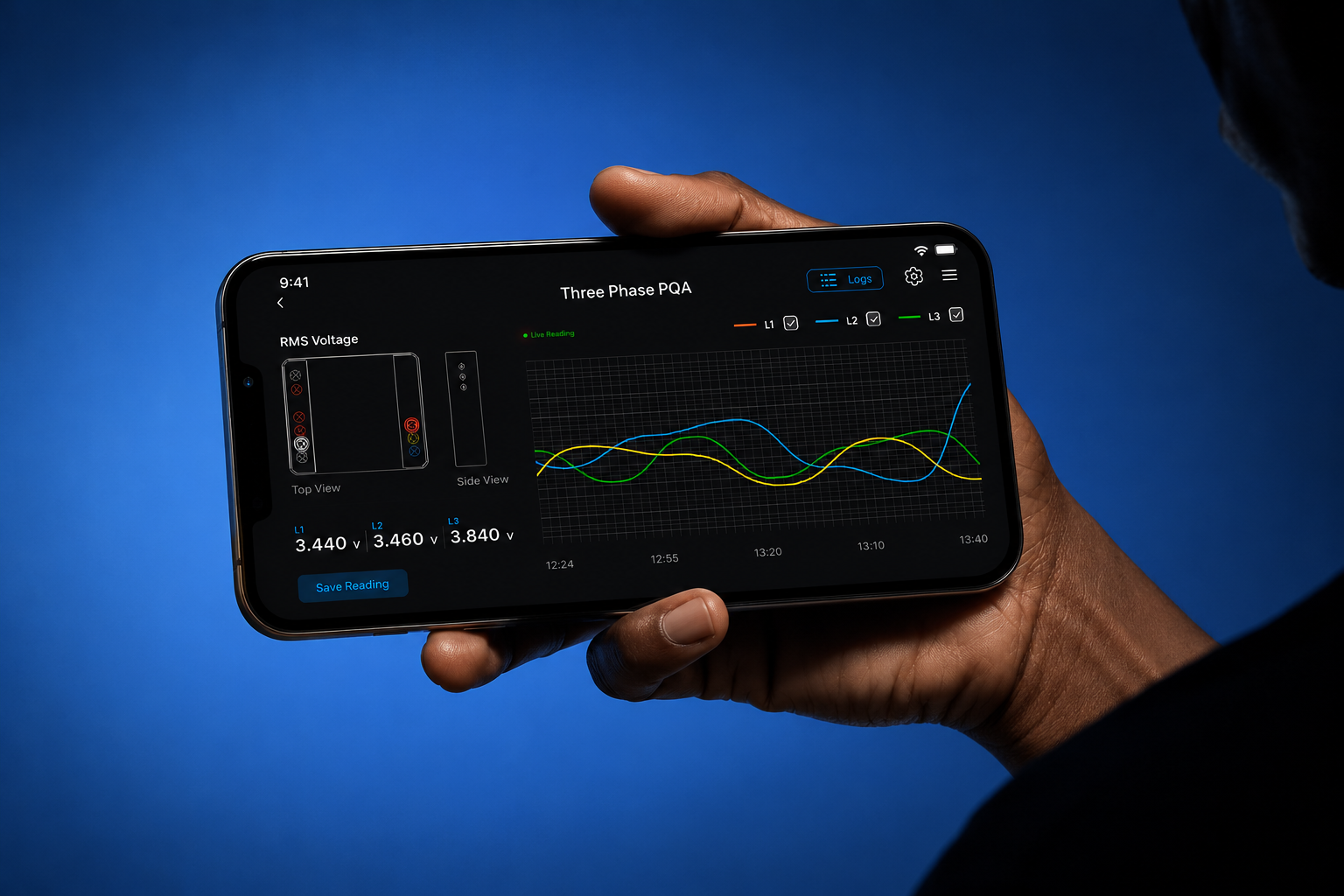
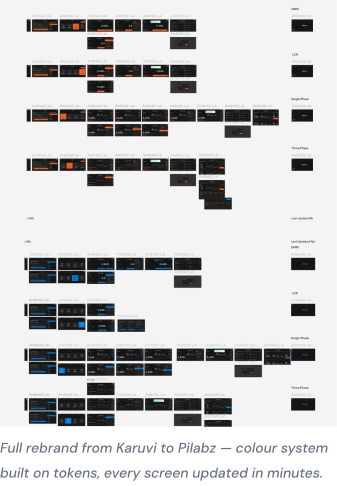
UVA app interface screens

Full rebrand from Karuvi to Pilabz - every screen updated from tokens.

04 — Design decisions

Four choices that shaped the measurement experience

Designed for physical-task attention, not desk attention

The interface was designed for users who are working around real electrical equipment, not calmly analysing a dashboard at a desk.

That changed the priorities: the primary reading had to stay dominant, actions had to be reachable, and supporting values had to remain visible without forcing close inspection. The UI needed to support divided attention between the device, probes, equipment, and screen.

Rejected

A dense engineering interface optimised for someone sitting still and reading every value carefully.
Designed the app as an extension of the instrument

The app was not treated as a companion dashboard. It functioned as the active interface of the measurement device.

That meant the UI had to behave with the same discipline as physical instrumentation: predictable zones, minimal interruption, clear state, large readings, and immediate access to measurement actions.

Rejected

A generic mobile app structure that treated measurement as content instead of an active instrument workflow.

Built one operating model across four instruments

UVA combined multiple instrument behaviours into one product experience. The challenge was not only displaying different readings, but making each instrument feel learnable through the same mental model.

Probe guidance, primary value, secondary values, graph area, logs, and actions stayed in predictable zones. This allowed users to switch between instruments without relearning the screen each time.

Rejected

Designing each instrument as a separate interface, which may fit the data better individually but increases learning effort across the product.

Removed input friction during live measurement

Free-text input was avoided during active sessions because the keyboard would compete with the most important content on a landscape screen: the live reading.

Instead, the interaction model was designed around taps, presets, mode selection, and clear actions. This kept the interface usable while the user was holding probes, checking connections, or standing near equipment.

Rejected

Form-heavy flows that required typing during measurement and interrupted the user’s physical workflow.

Some screens, values, and technical details are blurred or recreated with dummy data due to confidentiality.

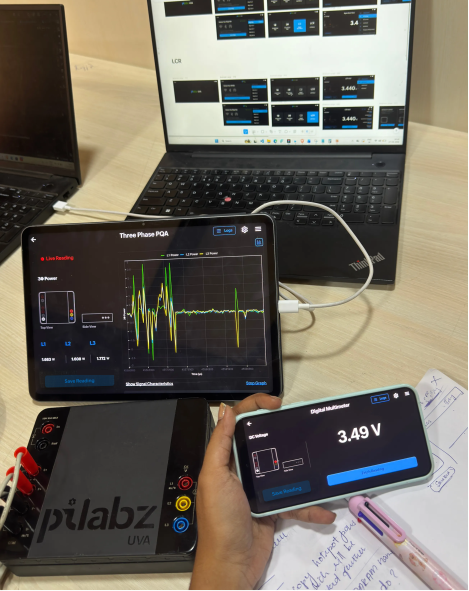
UVA prototype tested on real devices
End-to-end flow tested on real devices after development — validated across tablet and mobile
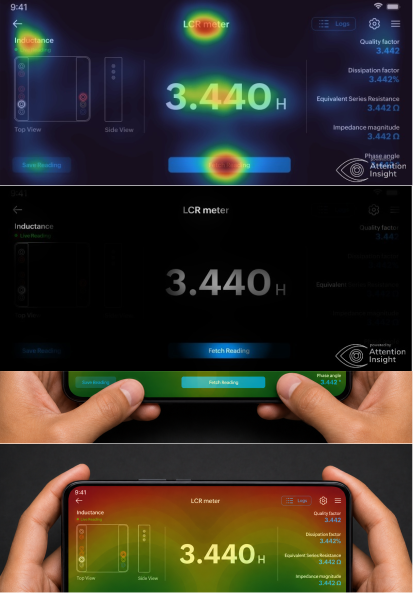
UVA attention and thumb reach testing screens
Attention tested. Focus mapped. Thumb reach verified. Every placement on this screen has a reason — and the data backs it.

05 — Outcome

Beta-ready app and connected product deliverables

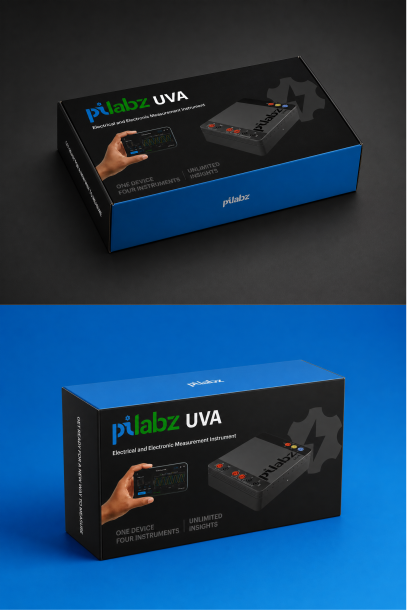
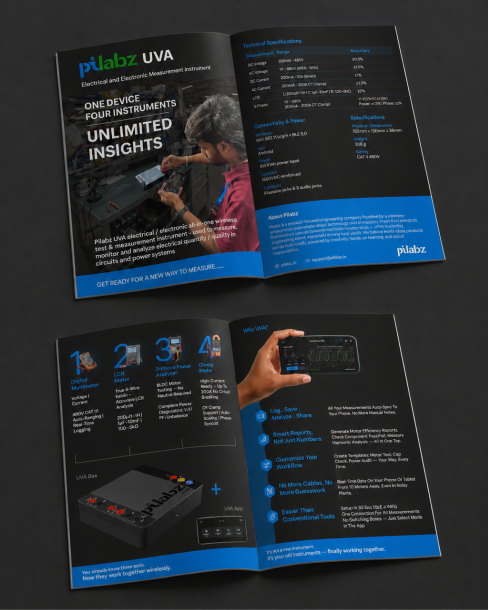
UVA reached final testing with the Android app prepared for beta release. As the only designer, I also extended the product’s visual language into brochure and packaging labels.

Pilabz UVA package front and angled view
Designed to sell the concept before the box is even opened.
Pilabz UVA brochure spread
Two spreads to convince a technical buyer with instrument functions, specs, and product value.

Metrics are based on moderated prototype walkthroughs with in-house electrical engineers. They are usability indicators, not post-launch analytics.

80%

Clearer probe setup

Engineers asked fewer setup-related questions after probe diagrams stayed visible on the live reading screen.

70%

Less mode confusion

Engineers moved between DMM, LCR, 1P PQA, and 3P PQA with less hesitation after the same layout logic was used across modes.

06 — Reflection

What this project taught me

A technical product does not need to feel complicated to feel professional. The right structure can make complex tools easier to trust.