Desktop software · Robotics · Admin + user modules

ASTRA — AMR Robot Control &
Monitoring

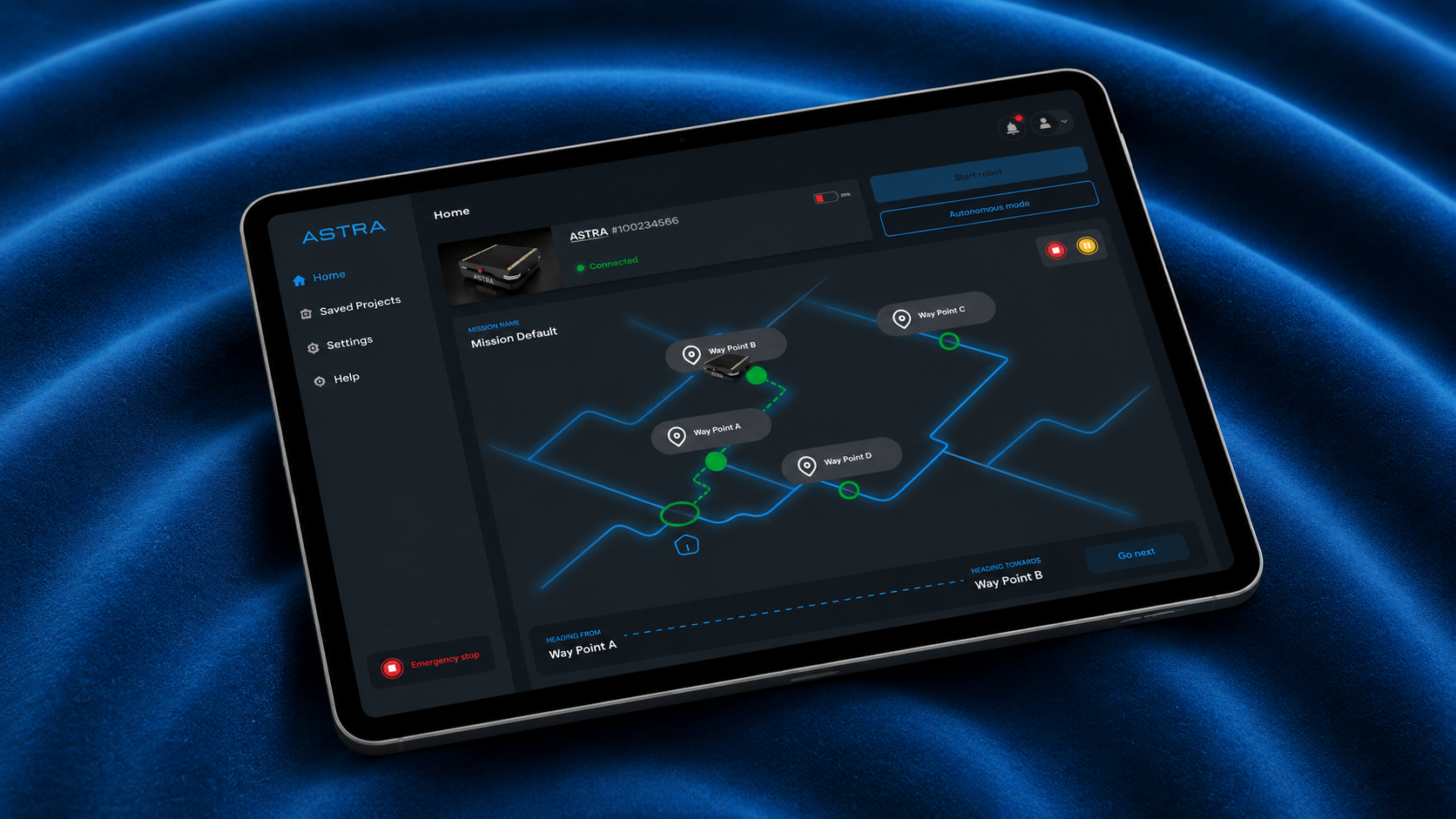
ASTRA is a desktop application for controlling and monitoring an autonomous mobile robot, from first connection to mission execution. I designed the admin and user modules from scratch as the solo designer.

Role
UI/UX Designer Sole designer · Research to handoff
Platform
Desktop software
Modules
Admin + User
Status
Product-ready · field-tested · then deprioritised

01 — Overview

Software for a machine that moves

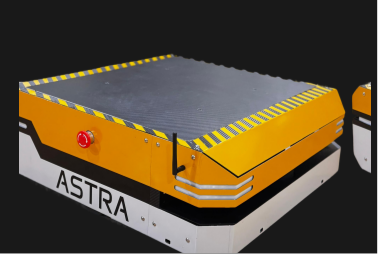
Pilabz built an autonomous mobile robot for facility navigation. ASTRA was the software layer that helped users map spaces, create waypoints, build missions, and execute robot movement.

The key challenge was designing an interface for a physical machine, where unclear states or skipped steps could affect real-world operation.

ASTRA robot

02 — Problem

A physical robot cannot rely on unclear UI

Before the robot could move, the user had to follow a strict sequence:

Connect robot
Load map
Create waypoints
Build mission
Execute mission

The UX challenge was to make robot readiness, mission progress, and safety actions clear at every step.

03 — Users

Admin setup. Operator execution.

Users
Needs
Admin
Create maps, waypoints, routes, and mission projects
Operator
Connect, monitor, and execute saved missions safely

Some map details, robot paths, internal controls, and technical information are blurred or recreated with dummy data due to confidentiality.

ASTRA interface screen previews

04 — Key UX decisions

Designing for clarity, sequence, and safety

Trust before control

Before an operator could send any command, the robot had to pair successfully, confirm its state, and load the live map.

I designed the connection flow as a trust-building moment, not just a technical loading state. Connecting, connected, failed, and lost-signal states were made visually distinct so operators always knew whether the robot was safe to act on.

Why it mattered

In robotics, a false sense of readiness can create real operational risk. The UI had to make system availability unambiguous before control was enabled.
Map as the operating surface

The home screen was designed around the live facility map because the robot’s primary context is physical space.

Once connected, the map became the centre of the interface. Controls were placed around it so operators could understand location, route, and motion before taking action.

Why it mattered

The operator’s first job was not to review metrics. It was to understand where the robot was and what it was doing in a real environment.

Matched UI structure to the operator’s mental model

The interface followed how operators think about the robot: Where is it? Is it ready? Where should it go? Is it moving safely? Can I stop it?

This helped the UI feel operational rather than software-driven.

Why it mattered

A technically correct interface can still feel confusing if it follows the system architecture instead of the user’s mental sequence.

05 — UX exploration

Designing for safety and recovery

During sessions with engineers and operators, one incident stood out: the robot detected an obstacle, silently rerouted, and kept moving. The operator had no idea. That led to the obstacle recovery warning, the only concept that shipped. The remaining five were wireframed and validated but not built before the product was deprioritised.

To strengthen ASTRA beyond the core control flow, I explored additional wireframes focused on safety, recovery, and operational trust.

The concepts included:

01

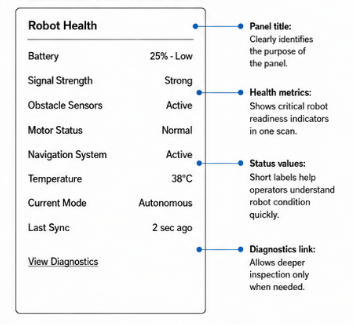
Robot health panel

Shows battery, signal sensors, motor status, and last sync

Robot health panel wireframe

02

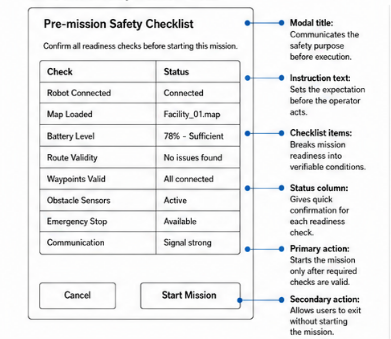
Pre-mission checklist

Confirms map, battery, signal, and mission readiness before movement

Pre-mission checklist wireframe

03

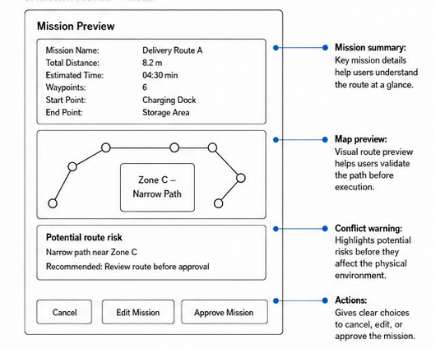
Mission preview

Lets users validate the route before the robot moves

Mission preview wireframe

04

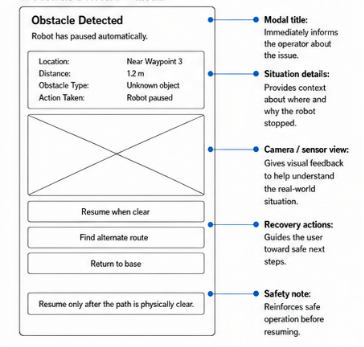
Obstacle recovery

Explains why the robot paused and gives safe next actions

Obstacle recovery wireframe

05

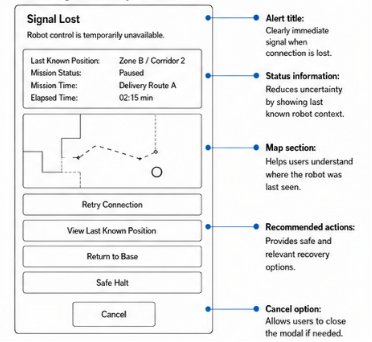
Lost signal recovery

Shows last known position and recovery options

Lost signal recovery wireframe

06

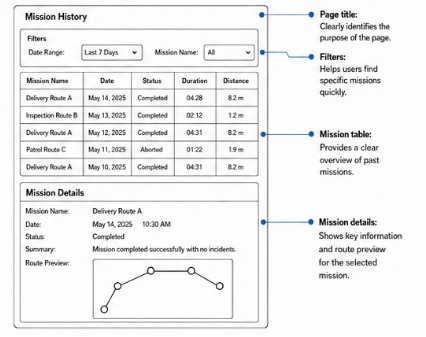
Mission audit trail

Helps teams review completed, paused, or failed missions

Mission audit trail wireframe

06 — Outcome

Product-ready and field-tested

ASTRA was designed, built, handed off, and tested in industrial environments. The product was later deprioritised due to market timing and limited AMR demand, not because of the design quality.

Metrics are based on moderated prototype walkthroughs with in-house engineers. They are usability indicators, not post-launch analytics.

92%

Task success

Robot readiness became clearer. During prototype testing, engineers correctly identified ready, failed, and lost-signal states after each state was visually separated.

Faster route understanding

Route understanding improved In map-reading tests, engineers understood the robot’s position and active route faster with the map-first layout.

07 — Reflection

What this project taught me

ASTRA taught me that robotics UX has physical consequences. A confusing state, skipped sequence, or hidden safety action can affect a real machine. This project helped me design failure states, safety flows, and recovery paths before focusing on the happy path.